Shadow AI does not walk in with a strategy deck.
Usually, it starts with one small line: “This will only take a second.”
A sales rep drops a client email into a chatbot. The support lead runs meeting notes through an AI tool. Finance uploads a sheet to a free app. Meanwhile, a developer pastes code into a public assistant because debugging at 6 p.m. apparently builds character.
At first, each move looks harmless. Together, these shortcuts create risks that IT cannot see, stop, or explain later.
Most staff are not trying to cause trouble. Instead, they want to save time. However, when AI tools sit outside approved systems, data can leak. Personal accounts can skip logs. Free tools can spread before anyone writes a rule.
In this blog, we will show you how to discover shadow AI at work, spot early signs, and set practical controls before hidden AI use becomes a security problem.
What Shadow AI Means For Modern Teams
Shadow AI means any AI tool used for work without IT approval. The tool may be a chatbot, browser add-on, meeting assistant, code helper, plugin, or workflow that sits outside IT control.
For example, an employee may use a public chatbot to rewrite a client email. Another person may use an AI note taker to summarize meetings. A developer may use a code assistant with a personal account. In each case, the work may look faster, but the risk may be hidden.
Unlike old shadow IT, these tools spread quickly. They are easy to test. They also feel easy to defend. After all, who wants to argue with “I saved two hours”?
Here is the real issue for IT leaders. The tool name matters, but the data path matters more. If business data is copied, pasted, uploaded, summarized, or stored outside approved controls, the company has a visibility problem.
Why Discovering Shadow AI Should Be A Priority
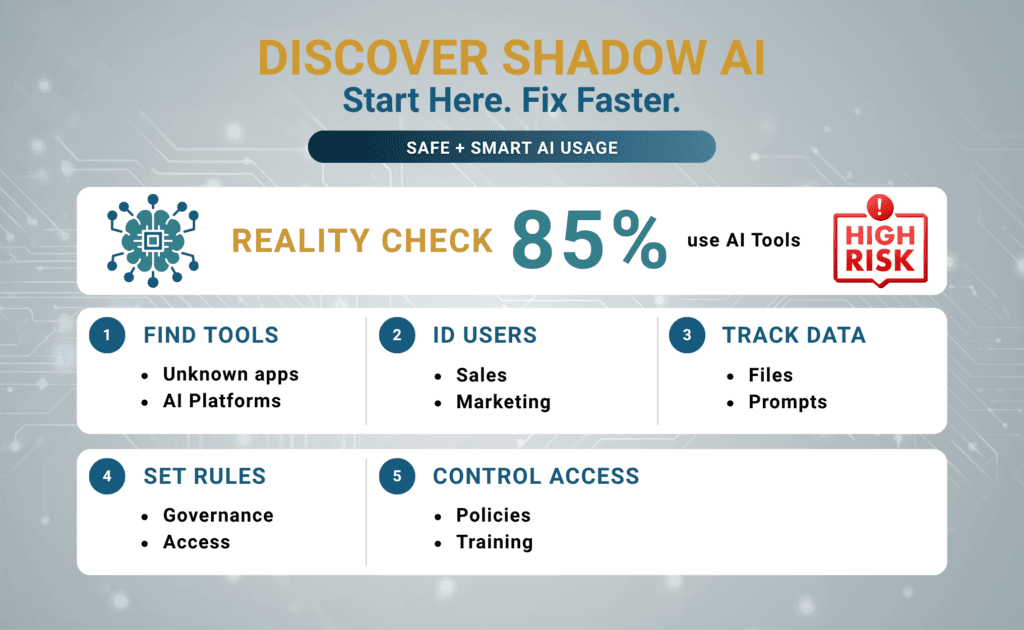
AI risk grows when IT finds the problem too late.
ManageEngine found a clear gap in 2025. In its report, 85% of IT decision-makers said staff were adopting AI tools before IT teams could assess them. As a result, hidden tools can touch business data before IT knows they exist.
For this reason, companies should discover shadow AI before they write strict rules. Otherwise, the policy may look neat while real work happens somewhere else.
A first review should answer four questions:
- Which AI tools are employees using?
- Which teams rely on them most?
- What data moves into prompts, files, links, or uploads?
- Which workflows need review, limits, or blocks?
From there, AI rules become easier to apply. Training gets more useful. Security checks also become more targeted. Most importantly, IT can separate helpful AI use from risky exposure.
Not sure where AI is already being used in your environment? Consltek’s Shadow AI Discovery Assessment can help identify unauthorized tools, risky data movement, personal account use, and control gaps before they become audit findings or client trust issues.
Common Signs Of Hidden AI Use
IT leaders should watch for early signs. A small shortcut can turn into an incident when sensitive data moves through the wrong tool.
Most firms do not find hidden AI use through one loud alert. Instead, clues show up in patterns. Browser traffic may change. Personal logins may appear. Files may leave approved systems. Customer drafts may show up faster than normal, even when no approved AI tool exists.
At that point, ChatGPT risk is no longer a theory. It becomes part of daily work.
| Sign | What It Usually Suggests |
| Frequent visits to public AI sites from work devices | Unapproved tool use for live tasks |
| Personal email logins on AI platforms | Weak admin control and missing logs |
| Fast drafts or summaries with no approved tool | Hidden AI use in daily workflows |
| AI browser add-ons across teams | Data risk through page access |
| SaaS AI features turned on without review | New data paths and unseen links |
Where Shadow AI Usually Appears First
Shadow AI often starts in busy teams. These groups feel pressure to move fast, so they try tools that cut routine work.
ManageEngine found another warning sign in 2025. It said 56% of office workers used unauthorized AI tools to summarize meeting notes or calls. This matters because hidden AI use often begins in normal work. Big tech projects are not always the starting point.
Marketing, Sales, And Support Teams
These teams live with constant output pressure. Emails pile up. Proposals need drafts. Follow-ups, replies, and summaries keep coming.
Naturally, AI looks useful. Draft time drops. People move faster. However, trouble starts when public tools enter the workflow before IT approves a safer choice.
HR, Finance, And Operations
These teams handle sensitive records every day. Payroll details carry risk. Staff files, reports, prices, and process documents do too.
Because of that, unapproved AI use can create quick exposure. Nobody wants payroll data sitting inside a free tool. That is not a vacation plan.
Software And Technical Teams
Developers often use AI for debugging, code tips, documentation, and scripts.
That support can be useful. Still, risk grows fast when code moves into public tools. Secrets, tickets, system details, and architecture notes may go there too.
Executives And Department Leaders
Senior teams may also use AI for board notes, client summaries, contracts, or planning documents.
This can create high-impact exposure. One copied strategy file may carry more risk than dozens of low-value prompts. So, discovery should not stop with technical teams.
How To Discover Shadow AI In Your Organization
AI risk drops when discovery becomes a routine process. A one-time audit is not enough.
A good process should support an employee AI usage policy. First, IT gets a clear view. Then the business can move toward safe use and better control.
The Consltek Shadow AI Discovery Method
A practical discovery effort should start where employees actually work. That means browsers, cloud apps, identity sign-ins, endpoints, files, meeting tools, and software tools.
The goal is not just to list AI apps. Instead, the goal is to understand where business data is being copied, pasted, uploaded, summarized, or processed outside approved controls.
1. Identify Access Points
To discover shadow AI, start by finding where AI tools enter the environment.
Check browser activity, secure web gateway logs, cloud app discovery, endpoint data, identity logs, meeting tools, code assistants, and browser extensions. Also review AI features already built into Software as a Service apps, such as Microsoft 365, Salesforce, HubSpot, or other cloud tools.
This step helps IT see the real entry points. Without that view, policy becomes guesswork.
2. Map Data Movement
Next, look at how data moves.
Review prompts, uploads, copied text, pasted content, shared links, exports, meeting transcripts, source code, client files, contracts, and sensitive records. In simple terms, a prompt is the text, file, or instruction an employee gives an AI tool to process.
This step matters because app names alone do not show risk. One team may use an AI tool for harmless grammar fixes. Another may upload client contracts. Those are not the same risk.
3. Classify Risk
After that, rank what you find.
Prioritize by department, data type, user role, business process, tool category, account type, and regulatory exposure. For example, a personal AI account used for payroll notes should rank higher than an approved tool used for public blog ideas.
This makes the review useful. IT can focus on the risky workflows first instead of treating every AI use case the same.
4. Separate Value From Exposure
Not every AI workflow should be blocked.
Some use cases help teams save time with low risk. Others create exposure that the business cannot accept. The key is to separate useful work from dangerous data movement.
This approach also helps with adoption. Employees are more likely to follow rules when IT enables safe AI use instead of acting like the fun police.
5. Build Practical Controls
Finally, turn findings into action.
Controls may include approved tools, employee guidance, access rules, browser controls, identity controls, cloud app visibility, and data protection rules. Data Loss Prevention, or DLP, can help stop sensitive information from leaving approved systems. A Cloud Access Security Broker, or CASB, can help monitor and control cloud app use.
In short, discovery should lead to a clear plan. The output should be a shadow AI inventory, usage map, risk tiers, control gaps, approved tool options, and policy exceptions.
How SASE Helps Detect And Control Shadow AI
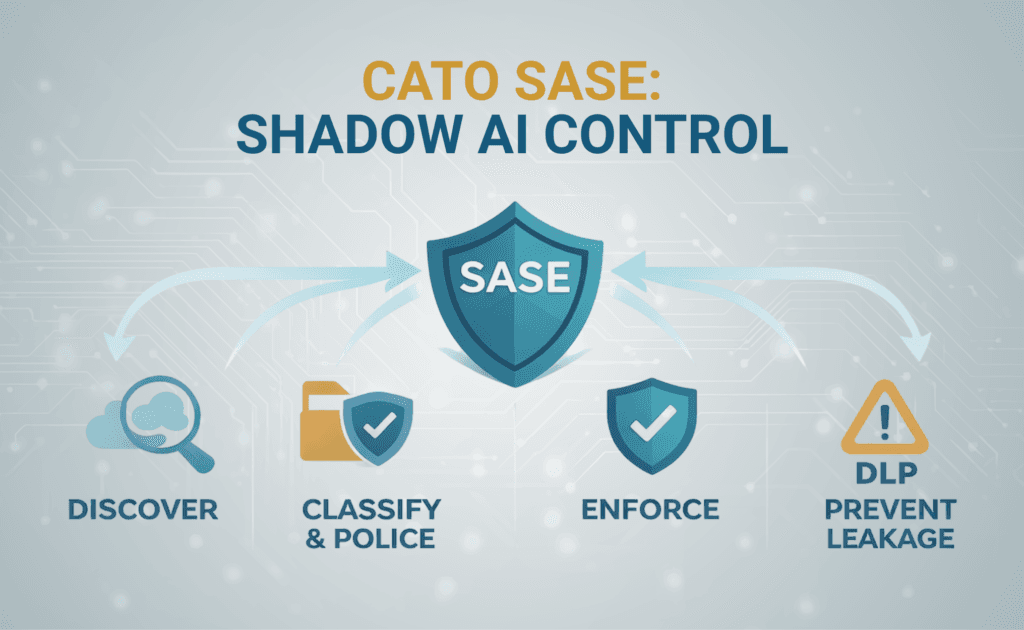
AI risk drops when three things work together: traffic visibility, access rules, and data checks. For that reason, SASE fits this problem well.
SASE stands for Secure Access Service Edge. It is a cloud-delivered model that combines network access and security controls. In plain English, it helps IT see who is using what, from where, and under which rules.
With SASE, security teams can see AI traffic across users and locations. They can also apply access rules. In addition, they can stop sensitive data from moving into risky prompts or uploads.
Cato Networks shared a related update in April 2025. Its CASB enhancements added a shadow AI dashboard. They also added a policy engine to help teams detect, classify, and govern generative AI use.
In practical terms, SASE helps in three ways:
- Visibility shows which AI apps people use across web and cloud traffic.
- Access rules decide who can use those tools and under what terms.
- Data checks help keep sensitive details out of risky AI workflows.
This gives IT a way to discover shadow AI first. After that, teams can govern use and apply controls without turning every workday into a security lecture.
Organizations exploring these risks in more detail can also join Consltek’s upcoming webinar, Compliance Chaos & Shadow AI Risk, which discusses how security teams can improve visibility, governance, and policy enforcement around unauthorized AI usage.
Bring Hidden AI Out Of Hiding Before It Gets Expensive
Shadow AI is not always a people problem. More often, it is a visibility problem.
Staff use AI because it saves time. Risk starts when those tools work outside policy. Access control may be weak. Logging may be missing. Data protection may not exist.
Banning every tool will not solve the issue. Finding real usage will.
Once IT knows which AI tools staff use, better choices become possible. The team can see what data is shared. Risky workflows become easier to rank. Approved tools can replace unsafe ones. Security can apply data leak controls. Governance can improve without slowing useful work.
Consltek can help organizations discover shadow AI through a focused Shadow AI Discovery Assessment. The process can identify unauthorized tools, risky data movement, personal account usage, and practical control gaps before they become audit findings, client trust issues, or incident response problems.
Think unapproved AI use is already hiding in your organization? Talk to Consltek about a Shadow AI Discovery Assessment before a shortcut becomes an incident.
FAQs
What is shadow AI in an organization?
Shadow AI is the use of AI tools for work without formal approval from IT. It also means IT lacks visibility or control. Examples include public chatbots, AI browser add-ons, personal AI accounts, meeting assistants, code tools, and built-in AI features inside business apps.
How can companies detect shadow AI?
Companies can review web traffic, cloud app activity, personal account use, browser add-ons, file uploads, identity logs, endpoint data, and team workflows. For better results, combine technical data with interviews and workflow reviews.
How do you create an AI usage policy?
Start with real behavior, not theory. List approved tools. Restrict sensitive data. Define who can use each tool. Require human review for risky outputs. Then connect the policy to technical controls.
Is ChatGPT safe for business data?
ChatGPT should not be used for private business data by default. First, the company must review the account type, controls, retention settings, and usage rules. Public or unmanaged use creates risk the team can avoid.
What tools help detect unapproved AI use?
Several controls can help. Some tools show which cloud applications employees use. Others help stop sensitive data from being copied, pasted, or uploaded into risky platforms. Browser controls can reveal extensions and personal account activity. Identity logs can show whether staff are using approved access. In technical terms, these controls may include a Cloud Access Security Broker, Data Loss Prevention, browser security, identity logs, secure web gateway logs, and SaaS discovery.
Need Expert Help?
Schedule a consultation with our team to discuss your specific security needs.
Book a Free Consultation