Every organization already has an immune system. It doesn’t look like antivirus software or a firewall; it looks like the accounts-payable clerk who pauses before wiring money, the receptionist who double-checks a visitor’s badge, and the new hire who asks a slightly awkward question instead of clicking “approve.” An immune system doesn’t need to recognize every possible threat in advance. It just needs to notice when something feels wrong, and react before the wrong thing spreads.
Roughly 60% of confirmed data breaches last year involved a human element, someone clicking, trusting, or not verifying, exactly the moment training is built for.
Most security budgets go toward building higher walls. Far less goes toward training the people already standing inside them, which is strange, given that a wall can’t protect anyone once an attacker simply asks, politely, to be let in. Calling employees the “weakest link” gets the metaphor backward. Untrained, they’re a vulnerability. Trained, they’re the only layer of defense that can adapt in real time, mid-conversation, without waiting on a software update.
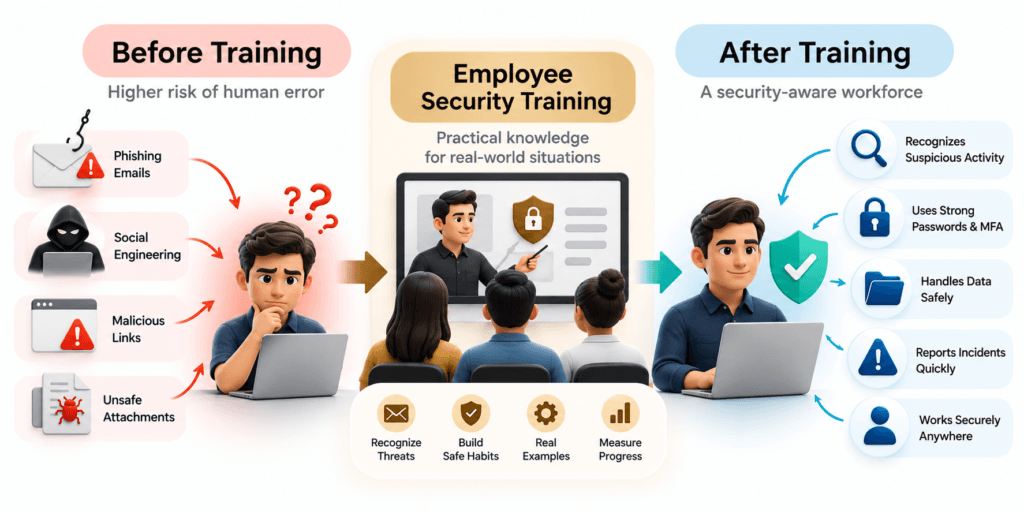
Your employees interact with emails, customer information, cloud applications, and business systems every day. A single rushed click, reused password, or unverified payment request can create unnecessary security risk. Consltek’s Employee Security Training helps businesses build safer everyday habits through practical, engaging, ongoing security awareness training, from phishing recognition and password security to social engineering and incident reporting, so your team knows what to look for, what to avoid, and what to do when something feels off.
What Is Employee Security Training?
Employee security training is a structured program that teaches people how to recognize, prevent, and report common cybersecurity threats. It focuses on the everyday decisions employees make while using company email, devices, applications, and data- decisions that often have to be made in seconds, with no time to consult a manual.
Unlike a one-time presentation, an effective program combines foundational education, practical examples, ongoing reminders, and a way to measure whether employees are actually applying what they’ve learned.
What Does Security Awareness Training Teach Employees?
• How to identify suspicious emails and phishing attempts
• How to recognize social engineering and impersonation scams
• How to create and protect strong passwords
• Why multifactor authentication (MFA) matters, and when to distrust it
• How to handle sensitive business and customer data
• How to use company devices and cloud applications safely
• How to report a suspected security incident without hesitation
• How to work securely from home or other remote locations
Employee Security Training vs. General Cybersecurity Training
Most businesses need both. Employee awareness and technical security controls work together rather than replacing one another.
Why Employee Security Training Matters for Your Business
Security tools can block a great deal, but they cannot replace an informed decision made in the moment. Employees are often the first people to see a suspicious email, an unexpected login prompt, or an unusual payment instruction. Giving them the knowledge and confidence to respond correctly adds a layer of protection no firewall can provide on its own. Verizon’s Data Breach Investigations Report has tracked that human-element figure falling every year since 2022, from 82% to 74%, to 68%, to roughly 60% in the most recent edition, which is real progress, and also a reminder of how much room is still left to close.
Reduce Human-Related Security Risks
Training helps employees recognize risky situations before they turn into incidents. The goal isn’t to assign blame when someone makes a mistake; it’s to make the secure choice the easy, obvious one, so the right instinct kicks in before the wrong click does.
Improve Phishing and Social Engineering Awareness
Attackers lean on urgency, impersonation, fake invoices, and familiar branding to get people to act fast. It works often enough that the FBI’s Internet Crime Complaint Center tied business email compromise alone to $2.77 billion in reported U.S. losses in 2024, across roughly 21,442 incidents, an average loss near $129,000 per successful scam, almost none of it requiring a single line of malicious code. In April 2025, the group behind the Marks & Spencer breach didn’t exploit a vulnerability at all; they social-engineered their way in, and the retailer spent weeks recovering. Training helps teams slow down for just long enough to verify a request and report it if something feels wrong.
Build a Stronger Security Culture
A healthy security culture encourages employees to ask questions and report mistakes early. People should feel comfortable saying “I clicked something I shouldn’t have” without fearing blame, because the ones who stay quiet are the ones who give an incident time to spread.
Support Business Risk and Compliance Objectives
Security awareness training can support an organization’s internal policies and risk-management program, and it can help with applicable compliance obligations. It doesn’t guarantee compliance on its own; requirements still depend on the organization’s industry, data, contracts, and applicable regulations.
What Our Employee Security Training Program Covers
Effective training should reflect the threats employees are actually likely to encounter, not a generic list of cybersecurity terms. Our program is structured around your organization’s users, systems, risk profile, and business requirements, the same categories that show up, again and again, in the incident reports from 2025.
Phishing Awareness Training
Recognizing Suspicious Emails and Messages
Employees learn to spot the warning signs before they click:
• Unexpected attachments or links
• Urgent requests for payments or credentials
• Unusual sender addresses or lookalike domain names
• Requests that bypass normal approval processes
• Messages engineered to create pressure to act immediately
Reporting Phishing Attempts
Training explains exactly how and where employees report suspicious emails, messages, and links, guidance that has to be simple enough to remember during a real, slightly panicked moment, not just on a quiz.
Social Engineering and Business Email Compromise
Common Social Engineering Techniques
This covers impersonation, pretexting, fake support requests, executive impersonation, and fraudulent payment instructions. A textbook example from 2025: someone called a Google employee, claimed to be internal IT, and talked them into sharing an 8-digit authorization code over the phone. Minutes later, the caller had access to a Salesforce database of business contacts, and Google was drafting a public breach disclosure. No malware, no exploit, just a convincing voice and a moment where nobody paused to verify. The same tactic and threat cluster has been linked to attacks on Qantas, Allianz Life, Adidas, and several other major brands throughout 2025.
Verifying High-Risk Requests
Employees should know when to verify a request through a separate, trusted communication channel, especially anything involving money, credentials, sensitive information, or a change to account details. A callback to a known number takes thirty seconds and stops most of these attacks cold.
Password Security and Multifactor Authentication
Safer Account and Password Habits
This section covers password managers, unique passwords per account, credential protection, and one simple rule that would have stopped the Google incident above cold: passwords and access codes are never shared over the phone, not even with someone who sounds exactly like IT.
Understanding MFA Fatigue and Suspicious Login Prompts
Employees learn not to approve an MFA request they didn’t trigger themselves, and to report repeated or unexpected prompts rather than tapping “approve” just to make the notifications stop.
Data Protection and Safe Information Handling
Handling Sensitive Business Information
This covers appropriate sharing, access permissions, email recipients, cloud storage, removable media, and secure disposal, based on your company’s policy. Coinbase’s May 2025 insider breach is a useful reminder that data handling isn’t only about outside attackers; it disclosed that overseas contractors with legitimate support-tool access were bribed to copy customer data, which is exactly the kind of access-and-judgment gap that training and clear handling policy are meant to close.
Safe Browsing, Devices, and Remote Work
Security Practices for Remote and Hybrid Employees
This includes device updates, secure Wi-Fi practices, screen locking, approved applications, and avoiding sensitive work on personal or untrusted devices- the everyday habits that matter more now that “the office” can be a kitchen table or an airport lounge.
Incident Reporting and Response Awareness
What Employees Should Do After a Mistake
A practical program tells employees exactly what to do if they click a suspicious link, disclose credentials, lose a device, or notice unusual activity. Scania’s June 2025 breach, traced back to stolen third-party credentials, is a reminder of how quickly a single compromised login can spread once it’s inside:
1. Stop interacting with the suspicious content.
2. Follow the organization’s reporting process.
3. Contact the designated IT or security team.
4. Do not delete evidence unless instructed to.
5. Follow the response team’s guidance from there.
CISA recommends training employees to recognize and report suspicious activity, and emphasizes building a culture where staff feel safe reporting a phishing attempt rather than hiding it.
Not sure where your own team’s exposure sits today? Consltek’s Email Security Scanner gives you a clear, free read on your current email defenses before you plan training around it.
How Our Security Awareness Training Program Works
This is the part that separates a real program from a page that just lists training topics. A generic module can teach the concept of phishing in the abstract; it can’t tell your finance team what a fraudulent wire request actually looks like when it’s dressed up in your CFO’s writing style. That context comes from a structured process, not a slide deck bought off a shelf.
Step 1: Understand Your Organization’s Risk Profile
We start by understanding your workforce, business operations, common communication channels, sensitive data, and existing security policies.
Step 2: Identify Training Needs
Training needs differ by department, job role, level of access, remote-work setup, and which threats are actually relevant to your organization.
Step 3: Deliver Practical, Engaging Training
Depending on the program design, this can include instructor-led sessions, online modules, short learning activities, scenario-based examples, and role-specific guidance, built around real incidents like the ones above, not abstract theory nobody can picture happening to them.
Step 4: Reinforce Learning Throughout the Year
Security awareness works better as an ongoing habit than a single annual event. Short reminders, updated examples, and periodic exercises keep the important behaviors from fading by month three.
Step 5: Measure and Improve the Program
We review participation, knowledge checks, reporting behavior, and other relevant indicators to see where the program needs more support, and adjust it rather than repeating the same module every year.
Industry benchmarking data from KnowBe4’s 2025 report found that organizations starting from a 33.1% average phishing susceptibility rate cut it by roughly 40% within three months of training, and by about 86% after a year of ongoing reinforcement.
Picture a 90-person accounting firm running its first phishing simulation: about a third of employees click. Nobody’s fired over it; that’s the baseline the whole program is built to move. By month three, after short, role-specific refreshers and one well-explained near-miss, the click rate has usually dropped by close to half. By the one-year mark, it’s a fraction of where it started, and, more importantly, the reporting number has flipped: more people are forwarding suspicious emails to IT than are falling for them. That shift, from silent clicking to active reporting, is the actual goal. The percentage is just how you prove it happened.
Role-Based Security Training for Different Teams
Not every employee faces the same risk, so not every employee needs the same training. The person approving wire transfers and the person managing a warehouse floor are not defending against the same attack, and treating their training as interchangeable wastes both of their time.
General Employees
Focus areas: phishing, password security, safe browsing, data handling, and incident reporting- the baseline every employee needs regardless of role.
Finance and Accounts Teams
This group covers invoice fraud, payment redirection, business email compromise, vendor impersonation, and verification procedures- the exact playbook attackers used in a string of 2025 vendor-impersonation scams targeting accounts-payable teams.
Executives and Senior Leadership
This covers executive impersonation, sensitive information handling, targeted attacks, and leadership’s own responsibilities during a security incident, including modeling the reporting behavior they expect from everyone else.
IT and Technical Teams
This includes more advanced security practices relevant to their access privileges, systems, and incident-handling procedures. Coinbase’s insider breach involved support staff with legitimate elevated access, a reminder that technical and support teams need training on judgment and escalation, not just tools.
Remote and Hybrid Workers
Focus areas: secure remote access, device security, home networks, cloud applications, and safe handling of company information outside the office. NIST’s guidance supports tailoring training to different audiences rather than treating every user as having identical needs.
Measuring the Effectiveness of Employee Security Training
Completing a training module isn’t the same as changing behavior. A useful program gives you a clearer view of participation, knowledge, and where the gaps actually are: five indicators worth tracking, not thirty nobody has time to review.
Employee Security Training for Compliance and Risk Management
Support Your Internal Security Policies
Training helps employees understand the policies that already govern passwords, data handling, access, devices, and incident reporting; policies are only as strong as people’s understanding of them. A password policy nobody has actually read isn’t protecting anything.
Align Training With Applicable Requirements
Depending on your organization, security awareness training may be relevant to frameworks, contractual obligations, or regulations such as HIPAA, PCI DSS, or other applicable requirements. Which ones apply, and how, is worth confirming with your own compliance or legal advisor rather than assuming.
Maintain Training Records
Organizations often need records of assigned training, completion, assessments, and updates to support internal governance or an audit. Training can help support compliance readiness; it isn’t, on its own, a guarantee of compliance, and any provider who tells you otherwise is oversimplifying a more complicated picture.
Why Choose Consltek for Employee Security Training?
This section is based on how we actually deliver the service, not on marketing language borrowed from a template. We won’t tell you a training program guarantees zero risk or a perfectly phishing-proof workforce- no honest provider would- but we can tell you what the program is actually built to do.
Training Built Around Your Business
We tailor training to employee roles, business processes, and your organization’s specific security needs, rather than handing every client the same generic module.
Practical, Human-Centered Learning
The program is built around clear examples and real behavior change, not fear-based messaging or dense technical jargon nobody remembers by Friday.
Ongoing Awareness, Not Just a One-Time Session
Reinforcement, updated content tied to current threats, and periodic measurement help awareness actually stick over the course of a year, not just the week after onboarding.
A Broader Managed Security Perspective
Consltek offers Employee Security Training as part of its wider Managed Security services, alongside risk management, vulnerability scanning, penetration testing, and related security capabilities, so training is informed by what your actual environment is exposed to, not a generic curriculum.
Frequently Asked Questions About Employee Security Training
1. What is employee security training?
It’s a program that teaches employees how to recognize, prevent, and report common cybersecurity threats, typically covering phishing, social engineering, password security, data protection, safe device use, and incident reporting, with the goal of helping employees make safer decisions on ordinary workdays, not just during a test.
2. Why is security awareness training important for businesses?
Employees regularly interact with emails, cloud applications, customer data, and business systems, which makes their awareness a real part of an organization’s risk-management strategy. It works best alongside technical safeguards like MFA, endpoint protection, email security, and access controls, not instead of them. Neither layer catches everything on its own; together they cover more of the gap.
3. What topics are covered in employee cybersecurity training?
Common topics include phishing awareness, social engineering, password security, multifactor authentication, safe browsing, data handling, mobile and remote-work security, malware awareness, and incident reporting, plus role-specific topics like payment fraud for finance teams.
4. How often should employees receive security awareness training?
Frequency should depend on your risk profile, policies, and the needs of different employee groups. Most organizations combine initial training for new hires with recurring awareness activities and updates whenever threats, systems, or policies change.
5. Does employee security training include phishing simulations?
It can, when simulations are appropriate for the organization and run with proper authorization. They’re most useful when designed for learning and improvement, not to embarrass or punish anyone who clicks.
6. Can employee security training help with compliance requirements?
It can help support compliance, governance, and risk-management objectives, but requirements vary by industry, regulation, and contract. Training is one part of a broader compliance program, not a substitute for the rest of it; check with your compliance advisor on what specifically applies to your business.
7. How can I choose the right employee security training provider?
Look for practical content, role-based training, ongoing reinforcement, measurable results, and a clear reporting process. Ask whether the program can be tailored to your risks and workforce, how often it’s updated as new threats emerge, and how the provider handles employee data along the way.
Build a Stronger Security Culture with Consltek
A security-aware workforce isn’t built in a single afternoon session. It’s built through clear guidance, regular practice, and a culture where employees know exactly what to do the moment something feels wrong- the difference between the employee who reports an odd call three minutes too late and the one who hangs up and calls IT back on a known number instead.
None of the incidents in this piece happened because a company skipped buying security software. They happened in the gap between a tool and a person, the moment where a policy exists on paper but nobody in the room remembers it under pressure. That gap is closeable, and it doesn’t take a bigger budget to close it. It takes training that people actually remember, delivered by someone who understands your business well enough to make the examples feel real instead of hypothetical.
Firewalls don’t get phone calls. Your people do, which makes them either your biggest exposure or your best-placed defense, and training is what decides which.
If you’re ready to build that kind of workforce, get Your IT Blueprint, a practical starting point built around your team, your risks, and where training would actually move the needle first.
Need Expert Help?
Schedule a consultation with our team to discuss your specific security needs.
Book a Free Consultation