Some of the most disruptive cloud outages in recent years have resulted from configuration errors and automated system changes rather than hardware failures.
Several of the large outages of the past two years began with a change rather than a failed machine: a DNS record left empty inside a database service, a policy update with blank fields, a configuration change at a global edge service, a cleanup task that withdrew customer network routes. That shifts how we think about disaster recovery in hybrid cloud environments, where on-premises systems, cloud services and the links between them all have to come back in the right order.
Hardware failures, ransomware, accidental deletion, cloud outages, network disruptions and regional disasters still belong in the plan. Our view is simple: replication gives you a copy, and only rehearsal gives you a recovery. This guide shows how to build both and support your wider business continuity planning.
What Is Disaster Recovery in a Hybrid Cloud Environment?
Understanding Hybrid Cloud Infrastructure
Hybrid means your workloads live in more than one place, and each place fails in its own way.
On-Premises Servers and Data Centers
These are the systems you physically control: servers, storage and the network between them. They fail through power, cooling, hardware and local security events, and recovery depends on spare capacity and people who can reach the site.
Public Cloud Infrastructure (AWS, Microsoft Azure and Google Cloud)
Hyperscalers remove hardware chores but add shared dependencies such as zones, regions, identity and DNS. Google’s October 2026 London incident, which the provider traced to a power event in a single zone, is a good reminder that the cloud still runs in buildings.
Private Cloud and Hybrid Workloads
Private clouds and colocation sit between the two. Many businesses run a mix, such as an on-premises database feeding a cloud web tier, so map those cross-boundary links early.
How Hybrid Cloud Disaster Recovery Works
The pattern has four moves. Data and servers are copied to a recovery location. A trigger, human or automated, starts the recovery environment. Users are redirected through DNS, load balancers or VPN changes. Once the original site is healthy, workloads return through a controlled failback. AWS Elastic Disaster Recovery and Azure Site Recovery both follow this sequence, and AWS notes that redirecting traffic is a step you perform yourself.
Disaster Recovery vs. Backup vs. Business Continuity
A backup is a copy of data. Disaster recovery is the ability to bring services back, including servers, networks and access. Business continuity is the wider question of how the organization keeps operating while that happens, from communications to manual workarounds. NIST’s contingency planning guide, SP 800-34 is a useful reference for how the pieces fit, even outside government.
Why Businesses Need a Hybrid Cloud Disaster Recovery Plan
Protection Against Hardware and Infrastructure Failures
Power, cooling and storage faults remain ordinary causes of downtime, in your data center and in a provider’s. The October 2026 London event disrupted UK banks and court systems even though the fault sat in one zone. A plan that assumes a site or zone will stay available carries a hidden assumption.
Ransomware and Cybersecurity Incidents
In September 2025, Jaguar Land Rover disclosed a cyberattack that halted production. Manufacturing restarted in phases from October 8, and the company subsequently reported £196 million in cyber-related exceptional costs for the quarter. CISA notes that many ransomware variants look for accessible backups, which is why its guide recommends offline, encrypted copies that are regularly tested. Recovering from an attack is a different exercise from recovering from a power cut, because you also have to decide what to trust.
Cloud Service and Regional Outages
The AWS incident began on October 19, 2025, and continued into October 20, with different services affected at different times. The initial DynamoDB disruption lasted approximately three hours, while cascading EC2 and network issues extended the broader incident to around 14.5 hours. Nine days later, a configuration change in Azure Front Door disrupted Microsoft services and customer sites for roughly eight hours. Neither was reported as a cyberattack, and customers could be affected without changing anything on their side.
Human Errors and Accidental Data Loss
People and their tools make mistakes. In July 2025, an AI coding agent in a public experiment deleted a production database during a code freeze. In February 2026, Cloudflare unintentionally withdrew about 1,100 customer network prefixes through an internal change it then reverted. The scale differs, the lesson does not: replication faithfully copies a deletion, so keep point-in-time recovery points as well.
Maintaining Business Operations During Disruptions
Recovery is judged by what customers and staff can do, not by what a dashboard says. Decide which processes must continue and how long they can run on workarounds. Those answers set the targets covered later in this guide.
How to Replicate On-Premises Workloads to the Cloud
Good disaster recovery planning turns on-premises to cloud replication into four deliberate steps.
Assess Your Existing IT Infrastructure
Identify Critical Applications and Servers
Rank applications by business impact, then trace each one to its servers and databases. Action: ask each department head which processes they could not run for a day.
Map Application Dependencies and Network Connections
Applications lean on directory services, DNS, certificates and file shares that nobody wrote down. Action: Use flow logs or a dependency-mapping tool to identify critical connections. For each supporting service, decide whether it needs replication, a separate recovery instance or an alternative connection that remains available during an outage.
Table 1. Critical Dependencies and Their Recovery Validation Checks
| Recovery component | Why it must recover | Validation before proceeding |
| Identity and authentication | Applications require working user and service access | Confirm emergency administrator and service-account authentication |
| DNS and network connectivity | Applications must locate servers and services | Check name resolution, routing and firewall access |
| Database services | Applications depend on usable transactional data | Confirm database connectivity and transaction consistency |
| Application services | Business processes require functioning software | Complete a real application transaction |
| External integrations | Payments, messaging and partner services may be outside the recovery site | Validate approved test connections and integration responses |
Choose the Right Cloud Disaster Recovery Strategy
The pattern you choose matters more than the provider, but each platform has native tooling worth knowing.
AWS Disaster Recovery Architecture
AWS Elastic Disaster Recovery replicates continuously to a low-cost staging area and converts servers into running instances only when you launch a drill or a recovery. That keeps idle cost down while leaving the recovery copy close behind production.
Microsoft Azure Disaster Recovery Architecture
Azure Site Recovery replicates on-premises VMs and physical servers to Azure and treats failover, reprotection and failback as separate stages. That staged model is helpful when you want a clear path home after an event.
Google Cloud Disaster Recovery Architecture
Google’s disaster recovery planning guide ties design to recovery targets and explains that tighter targets generally cost more and add complexity. Its guidance on cloud infrastructure outages helps you decide between zone-level and region-level protection.
A Google Cloud disaster recovery design may combine Compute Engine for application workloads, Cloud Storage for backup data, and Cloud SQL cross-region replicas for supported databases. Regional storage can help protect against zone failures, while workloads requiring regional disaster recovery need independently designed cross-region protection.
Configure Data and Workload Replication
Continuous Data Replication
Block-level or log-based replication keeps the recovery copy seconds or minutes behind, which suits transactional systems. Action: size bandwidth for peak change rates, not averages.
Scheduled and Asynchronous Replication
Asynchronous replication transfers changes without requiring the primary system to wait for confirmation from the recovery site. It can operate continuously but may experience replication lag. Scheduled replication transfers data at defined intervals, which creates a larger potential data-loss window between recovery points. Action: set the interval from your documented recovery point.
Application-Consistent Replication
A crash-consistent copy resembles a server that lost power. Some databases need application-consistent snapshots to start cleanly. Action: restore one database from replicated data during a drill.
Secure Data During Replication
Encryption in Transit and at Rest
Encrypt the replication channel and the recovery storage and keep the keys somewhere that survives the same event as the data. Action: document where keys live and who can retrieve them outside business hours.
Access Controls and Identity Management
Give replication services least-privilege credentials and separate recovery accounts from daily admin accounts. Identity is also a dependency: during the 2025 AWS event, global features such as IAM updates relied on US-EAST-1. Action: keep break-glass admin access that does not depend on the system you are recovering.
Immutable Backup and Ransomware Protection
Pair replication with immutable or offline copies so one compromised credential cannot erase every copy, in line with CISA’s offline backup guidance. Action: enable object lock or a retention lock on at least one copy and restrict who can disable it.
Choosing the Right Disaster Recovery Strategy for Hybrid IT
AWS describes four patterns in its disaster recovery whitepaper that apply well beyond AWS. Think of them as a ladder from inexpensive and slower to costly and faster.
Backup and Restore
Copies are stored and systems are rebuilt after an event. It has the lowest cost and the longest recovery, and it suits archives, development systems and workloads that can wait hours or days.
Pilot Light Disaster Recovery
The data layer is replicated and core infrastructure is defined, but compute stays off until needed. One caution from 2025: AWS reported instance launch failures in US-EAST-1 during its outage. If your plan depends on launching capacity during a regional event, test that dependency.
Warm Standby Architecture
A scaled-down but running copy of the full environment that scales up during failover. Because it can handle some traffic immediately, it typically recovers faster than pilot light. When the standby environment is maintained at full capacity, it is known as hot standby. This reduces the need to provision additional resources during recovery but increases operating costs.
Hot Standby and Active-Active Environments
In a multi-site active-active architecture, two or more sites serve production traffic simultaneously. If one site fails, traffic can be directed to the remaining healthy sites. This approach supports very low recovery times but involves higher infrastructure costs and greater complexity in data synchronization, traffic management and maintaining consistency across locations.
Which Disaster Recovery Strategy Is Right for Your Business?
Match the pattern to the workload tier, not to the company. Many mid-sized organizations end up with a mix: backup and restore for most systems, pilot light or warm standby for a handful, and active-active for one or two at most. If running this in-house is unrealistic, Disaster Recovery as a Service (DRaaS) bundles replication, orchestration and testing. Action: choose the least expensive pattern that meets each tier’s target, and pay for more only where a test shows a gap.
Table 2. How Recovery Decisions Change Across Disaster Scenarios
| Disaster scenario | Immediate decision | Important recovery safeguard |
| Ransomware attack | Isolate compromised systems before initiating recovery | Restore from a verified clean recovery point |
| Cloud region outage | Determine whether the recovery region has sufficient capacity | Confirm independent access, networking and control-plane dependencies |
| Accidental deletion | Identify the last valid recovery point | Use point-in-time restore rather than copying the latest deletion |
| Network connectivity failure | Establish whether workloads are healthy but unreachable | Activate an independent network route where available |
| Database corruption | Determine when corruption began | Validate the restored database before reopening application writes |
Understanding RTO and RPO in Disaster Recovery
What Is the Recovery Time Objective (RTO)?
Recovery time objective is the longest outage a business process can tolerate before the damage becomes unacceptable. It covers the whole path: detecting the event, deciding to fail over, starting systems, validating them and redirecting users.
What Is Recovery Point Objective (RPO)?
Recovery point objective is how much recent data you can afford to lose, expressed in time. Achieving the RPO depends on the availability of usable recovery points, actual replication lag and data consistency. Frequent replication can reduce potential data loss, but it does not guarantee that every replicated recovery point will be usable.
How to Set RTO and RPO Based on Business Priorities
Start with a business impact analysis, an early step in NIST’s contingency planning guide. For each process, estimate hourly downtime cost, regulatory exposure and customer impact, then propose targets. Because lower targets raise cost and complexity, push back on requests for zero with a price. Action: show each owner two options with their costs and let them choose.
Example RTO and RPO Targets for Different Workloads
These starting points are illustrative. Validate them through your own impact analysis and measure them in tests.
| Workload tier | Example systems | Illustrative RTO | Illustrative RPO | Common pattern |
| Tier 1 | Order processing, payments, patient portals | Under 1 hour | Minutes | Warm standby or active-active |
| Tier 2 | ERP, email, core databases | 4 hours | 15 to 60 minutes | Pilot light or warm standby |
| Tier 3 | Internal tools, reporting | 24 hours | 24 hours | Backup and restore |
| Tier 4 | Archives, test systems | 72 hours or more | 24 hours or more | Backup and restore |
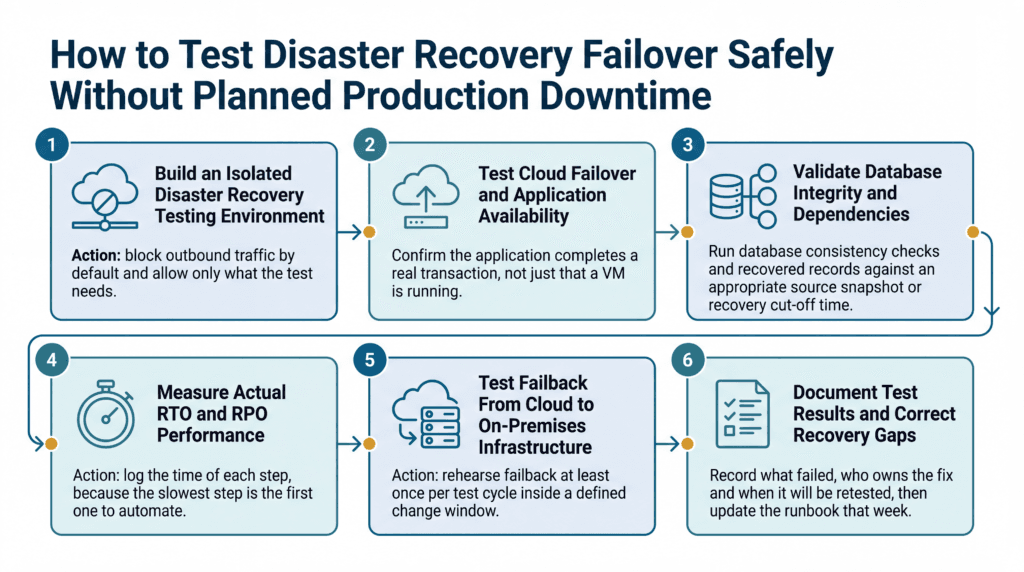
How to Test Disaster Recovery Failover Safely Without Planned Production Downtime
Disaster recovery testing is where plans become evidence, and the major tools support it. AWS drills do not affect source servers or ongoing replication, and Azure Site Recovery can run a test failover on one VM or a whole recovery plan.
Build an Isolated Disaster Recovery Testing Environment
Launch recovery copies into a separate network with no route to production addresses, shared databases or live integrations such as payment and email gateways. AWS describes launching copies into an isolated network while replication continues. Action: block outbound traffic by default and allow only what the test needs.
Test Cloud Failover and Application Availability
Confirm the application completes a real transaction, not just that a VM is running. Check logins, DNS, certificates and external allow-lists that reference old IP addresses. AWS’s own guidance cautions that launching an instance is not enough to call a drill a success.
Validate Database Integrity and Application Dependencies
Run database consistency checks and compare recovered records against an appropriate source snapshot or recovery cut-off time. Confirm that the latest recovered transactions meet the RPO and that identity services, application dependencies and file shares are functioning correctly.
Measure Actual RTO and RPO Performance
Measure recovery time from the point when the service becomes unavailable until users can successfully complete critical business transactions. Record detection time, disaster declaration, system restoration and application validation separately. This helps identify delays that may be hidden when recovery time is measured only after the disaster is declared. Action: log the time of each step, because the slowest step is the first one to automate.
Test Failback From Cloud to On-Premises Infrastructure
Failback is the step teams skip and then regret. Azure Site Recovery treats it as its own stage, with reprotection and a second failover, and you should plan for brief downtime during the switch. Action: rehearse failback at least once per test cycle inside a defined change window.
Document Test Results and Correct Recovery Gaps
Record what failed, who owns the fix and when it will be retested, then update the runbook that week.
Table 3: Disaster Recovery Test Acceptance Criteria
| Test area | Success criteria | Evidence |
| Application recovery | Actual recovery time meets the approved RTO | Timestamp of successful business transaction |
| Data recovery | Recovered data meets the approved RPO | Latest validated recovery-point timestamp |
| Data integrity | Required records and relationships are consistent | Database validation report |
| Security | Only approved identities can access recovered systems | Authentication and privileged-access logs |
| Business validation | Critical application workflows operate correctly | Business-owner sign-off |
| Failback readiness | Data can be synchronized and services safely returned | Periodic failback exercise report |
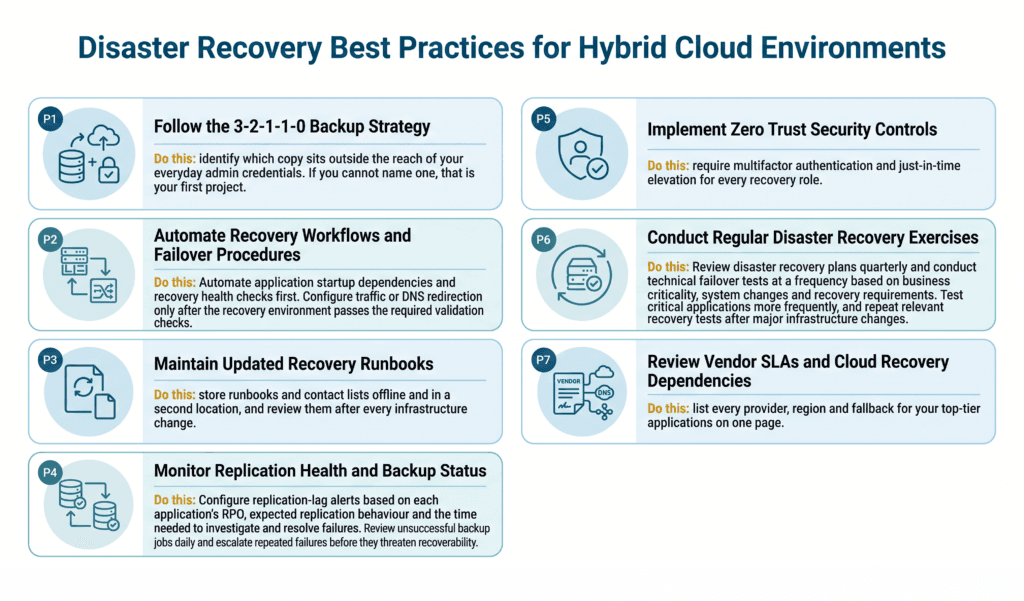
Disaster Recovery Best Practices for Hybrid Cloud Environments
Follow the 3-2-1-1-0 Backup Strategy
Keep three copies on two media types, one offsite, one offline or immutable, and verify recovery to zero errors, as Veeam describes the rule. Do this: identify which copy sits outside the reach of your everyday admin credentials. If you cannot name one, that is your first project.
Automate Recovery Workflows and Failover Procedures
Automated failover reduces typing under pressure, and AWS advises recording the order in which servers and applications must launch in the recovery plan. Keep a human decision at the point of declaring a disaster. Do this: Automate application startup dependencies and recovery health checks first. Configure traffic or DNS redirection only after the recovery environment passes the required validation checks.
Maintain Updated Recovery Runbooks
A runbook is only as good as its last review, and it must be reachable when your systems are not. During Google’s June 2025 cloud outage, updates to Personalized Service Health were delayed. This demonstrates why businesses should maintain independent communication channels, offline recovery runbooks and alternative ways to obtain incident updates.
Do this: store runbooks and contact lists offline and in a second location, and review them after every infrastructure change.
Monitor Replication Health and Backup Status
A silently stalled replica turns your recovery point objective into fiction.
Do this: Configure replication-lag alerts based on each application’s RPO, expected replication behaviour and the time needed to investigate and resolve failures. Review unsuccessful backup jobs daily and escalate repeated failures before they threaten recoverability.
Implement Zero Trust Security Controls
NIST SP 800-207 describes zero trust as narrowing defenses from wide network perimeters to individual resources. Recovery environments deserve the same treatment, since they often carry broad temporary access. Do this: require multifactor authentication and just-in-time elevation for every recovery role.
Conduct Regular Disaster Recovery Exercises
Tabletop exercises test decisions and communication, and technical drills test systems. Use both, with different scenarios such as ransomware or a regional outage.
Do this: Review disaster recovery plans quarterly and conduct technical failover tests at a frequency based on business criticality, system changes and recovery requirements. Test critical applications more frequently, and repeat relevant recovery tests after major infrastructure changes.
Review Vendor SLAs and Cloud Recovery Dependencies
Read what each agreement promises and excludes, and ask which providers share a dependency such as DNS or a content delivery network.
Do this: list every provider, region and fallback for your top-tier applications on one page.
Common Hybrid Cloud Disaster Recovery Mistakes to Avoid
Assuming Replication Replaces Backup
Replication copies changes, including deletions and corruption. Keep point-in-time recovery points beside it.
Ignoring Application Dependencies
A recovered application that cannot reach identity, licensing or a partner allow-list is still down. Recover supporting services together with the application.
Failing to Test Recovery Procedures
Paper plans hide gaps such as expired credentials and outdated firewall rules. Start small: one application, one drill, one lesson.
Setting Unrealistic RTO and RPO Targets
A target nobody can meet is decoration. Compare each one with measured test results, then fund the gap or change the target.
Overlooking Network and DNS Failover
Servers can be healthy and still unreachable. Plan DNS time-to-live values, VPN paths, firewall rules and certificates, since several incidents above involved DNS or routing.
Forgetting Recovery Costs and Cloud Capacity
Running a recovery site costs compute, egress and licenses. Capacity can also be tight: in Google’s London event, customers could not yet create new workloads while existing ones were prioritized. Reserve or pre-provision capacity for tier 1 systems.
How Consltek Helps Businesses Build a Reliable Disaster Recovery Strategy
We treat disaster recovery as a business problem first and a tooling choice second, and we stay vendor-independent, as outlined on our solutions page. Managed disaster recovery services work best when assessment, replication, monitoring and testing sit with one accountable team.
IT Infrastructure Assessment and Recovery Planning
We start by ranking applications, mapping dependencies and agreeing targets with the people who own each process. The output is a recovery plan written for decision-makers as well as engineers.
Cloud Backup and Workload Replication
We design cloud backup and on-premises to cloud replication around your tiers, with an immutable copy for ransomware scenarios.
Managed Infrastructure and Cloud Monitoring
Through managed infrastructure, networks, servers and cloud are monitored continuously, so replication lag and capacity problems surface before they matter.
Disaster Recovery Testing and Business Continuity Support
We run tabletop exercises and technical drills, record measured recovery times and turn the gaps into a short remediation list.
Ongoing Security, Risk Management and Recovery Monitoring
With managed security and governance, risk and compliance work, recovery stays connected to your risk register and audit evidence rather than living in a once-a-year document.
Conclusion: Building a Resilient Hybrid Cloud Disaster Recovery Plan
Workload replication, realistic recovery targets, tested procedures and continuous monitoring work as a set. Here is a practical first 90 days:
- Days 1 to 30: rank applications by business impact, map their dependencies and agree draft RTO and RPO targets with each owner.
- Days 31 to 60: replicate your top tier to the cloud, protect one copy with immutability and set replication-lag alerts.
- Days 61 to 90: run an isolated failover drill, measure real recovery times, fix the three largest gaps and schedule the next test.
If you would like a second opinion on your tiers, targets and test results, book a disaster recovery consultation with Consltek and we will walk through them with you.
Frequently Asked Questions
What is disaster recovery in a hybrid cloud environment?
It is restoring systems, applications and data after a disruption by combining on-premises infrastructure with cloud recovery resources. Workloads are replicated ahead of time and started in the recovery environment when the primary site is unavailable.
How does hybrid cloud disaster recovery work?
Data and servers are replicated to a cloud or secondary site. After a disruption, teams start the replicated workloads, redirect traffic and validate the applications, then fail back once the primary site recovers.
What is the difference between disaster recovery and cloud backup?
A backup is a stored copy of data. Disaster recovery restores working services, including servers, networks and access, using backups plus replication, orchestration and testing.
What are RTO and RPO in disaster recovery?
Recovery time objective is the longest acceptable outage. Recovery point objective is the most data, measured in time, you can afford to lose. A two-hour RTO with a 15-minute RPO means services return within two hours using data no older than 15 minutes.
How often should businesses test their disaster recovery plan?
Businesses should review disaster recovery plans quarterly and schedule technical failover tests based on application criticality, recovery targets and infrastructure changes. Critical systems may require more frequent testing, especially after major updates.
Can businesses test disaster recovery failover without affecting production?
Yes. Many disaster recovery platforms support isolated test failovers that do not interrupt production workloads when configured correctly. However, teams must isolate test networks, prevent unintended connections to live systems and validate all dependencies before beginning the exercise.
What is the best disaster recovery solution for small and mid-sized businesses?
It depends on infrastructure, budget, security needs and recovery targets. Many smaller organizations start with managed cloud backup, replication for a few critical systems and scheduled failover tests.
Need Expert Help?
Schedule a consultation with our team to discuss your specific security needs.
Book a Free Consultation