Unplanned outages during an MSP transition can arise from undocumented dependencies as well as migration errors. It is the list nobody wrote down: every password, license, domain record, and scheduled job your current provider quietly holds on your behalf.
You can significantly reduce the risk of unplanned downtime when switching managed IT providers by taking three steps in sequence: securing company-controlled administrative access, running both providers in parallel, and completing the handover only after critical systems and support processes have been tested.
This guide outlines a practical, risk-based approach to switching managed IT service providers, drawing on established IT transition practices, cybersecurity guidance, and real-world incidents. It explains how mid-sized U.S. businesses can protect critical systems, maintain service continuity.
Why Mid-Sized Businesses Outgrow Their MSP
The 50 to 150 Employee Tipping Point
Smaller businesses may initially prioritize responsive help-desk support, but growing organizations often require broader IT planning and governance. For businesses with 50–150 employees, growing infrastructure and security demands often require more structured IT management. A second office opens, customers send security questionnaires, an insurer asks for proof of controls, and the first audit lands on someone’s desk. The provider that fit at 25 users keeps doing the same job while the job grows.
Action: Count your users, sites, and compliance obligations today, then compare that list with what your agreement actually covers.
Reactive Ticket-Based Support vs. Strategic IT Leadership
Reactive support addresses immediate technical problems. Strategic IT leadership focuses on which systems need replacement, improvement, or retirement and the associated future costs. That second role is often called a virtual CIO, or vCIO. For growing businesses, strategic IT planning can become as important as help-desk response times.
Action: Ask your provider for the notes from your last quarterly business review. If there was no review, you have learned something useful.
9 Signs It’s Time to Switch Managed IT Providers
Some warning signs justify further discussion, while serious security failures, access restrictions, or repeated service problems may warrant changing providers. One warning sign may justify a discussion, while multiple recurring problems can indicate the need for a formal provider review. Each sign ends with one step you can take without changing providers.
1. The Same Problems Keep Coming Back
If the same printer, VPN, or password issue reaches your help desk month after month, tickets are being closed instead of fixed.
Action: Export ninety days of tickets, group them by cause, and ask for a root-cause fix and a completion date for the top three.
2. No One Owns Your IT Roadmap
Microsoft ended support for standard Windows 10 editions on October 14, 2025. Eligible commercial customers can purchase Extended Security Updates for up to three additional years, but these provide critical and important security updates rather than full product support. A roadmap names the owner, the date, and the budget for each change.
Action: Ask for a twelve-month roadmap that lists end-of-support dates, hardware refreshes, and license renewals, each with a named owner and a cost.
3. You Can’t See Where Your IT Budget Goes
A monthly invoice with one total for “managed services” hides more than it shows. If you cannot say what you pay for each tool, license, and project, you cannot tell whether the spend is working.
Action: Ask for an itemized view of the last three invoices that separates the provider’s fee from software, licenses, and project work.
Unused SaaS Licenses and Duplicate Tools
Subscriptions are added more easily than they are removed. Look for seats assigned to people who left, and for two products doing one job, such as two backup tools or two remote access tools.
Action: Pull the user report from each admin console, not the invoice, and match licensed users to current staff.
4. Security Is Treated as an Add-On
Verizon’s 2025 Data Breach Investigations Report found that third-party involvement in breaches doubled from 15% to 30%. Your provider has deep access to your systems, so its security habits become part of yours. When security shows up only as an upsell, it tends to be bought after something goes wrong instead of designed in.
Action: Ask your provider to describe in writing how it secures its own access to your environment: who can sign in, with what protection, and how that access is reviewed.
Missing MFA, EDR, or Tested Backups
Three security controls provide useful indicators of an MSP’s effectiveness. Multi-factor authentication (MFA) adds a second check at sign-in. Endpoint detection and response (EDR) is software that watches laptops and servers for suspicious behavior. A tested backup is one where someone has actually restored data and confirmed it works.
Action: Ask for three pieces of evidence: MFA coverage by user, EDR installed against your device count, and the date and result of the last restore test.
5. Compliance Gaps (HIPAA and CMMC)
Rules are moving, and providers that treat compliance as a yearly scramble will struggle. For businesses in the U.S. defense supply chain, CMMC compliance remains an important consideration. The program’s contractual roll-out began on November 10, 2025. However, on July 13, 2026, the Department of Defense announced the suspension of Phase II requirements that had originally been scheduled for November 10, 2026. Phase I self-assessment requirements remain in place. Businesses should verify the applicable assessment requirements for each contract and monitor official updates before planning certification activities. In healthcare, HHS published proposed changes to the HIPAA Security Rule in January 2025, including stronger requirements for multi-factor authentication and encryption of electronic protected health information. The federal regulatory agenda currently projects final action in July 2027. However, this is a planning estimate rather than a confirmed implementation deadline. Healthcare organizations must continue complying with the existing HIPAA Security Rule while monitoring the proposed changes.
Action: Ask your provider for a compliance control map identifying each applicable requirement, the technical or administrative safeguard used to address it, the responsible party, and the evidence required to demonstrate compliance.
6. Slow Response Times and Missed SLAs
A service level agreement (SLA) defines measurable service commitments, including applicable response and resolution targets. It only means something if someone measures it, and averages can hide the slow tickets.
Action: Pull last quarter’s raw ticket data and compare first-response and resolution times with the contract, by priority level.
7. You Don’t Own Your IT Documentation
Network diagrams, license lists, and the password vault are business records. If they live only in your provider’s tools, your leverage on exit day is limited.
Action: Request a full export of your documentation this month and note how long it takes and what format arrives. Screenshots alone do not constitute a complete or usable IT documentation package.
8. Your Employees Have Built Workarounds
When people use personal file-sharing accounts, share one login, or keep private lists of passwords, they are telling you the official tools or support are not meeting a need. Workarounds are data, not misbehavior.
Action: Ask five department leads what they do when IT is slow or a tool gets in the way. Fix the top three answers before you assign blame.
9. Your MSP Can’t Support Multiple Locations or Hybrid Work
A second office, a warehouse, or remote staff in several states adds work that a one-site provider may not be set up to handle: internet circuits, on-site hands, consistent device standards, and home-office issues.
Action: List each location and remote profile, then ask your provider who handles hardware swaps, circuit outages, and home-office problems, and how quickly.
Switch, Renegotiate, or Move to Co-Managed IT?
Not every sign calls for a new provider. Start by identifying whether the main problem is cost, service capacity, or accountability. Choose the least disruptive solution that addresses the problem.
When Renegotiating Makes Sense
If the technical work is sound but the scope, price, or reporting is off, renegotiate. Renegotiation preserves institutional knowledge and avoids unnecessary transition risks. Bring your evidence: the ticket analysis, the invoice breakdown, and the roadmap you want.
Action: Put your requests in a written amendment with dates and named owners, and set a 90-day review.
When Co-Managed IT Is the Better Fit
If you have internal IT staff who are capable but stretched, co-managed IT lets them keep ownership while an outside team covers gaps such as security monitoring, after-hours support, or specialized projects.
Action: Draft a one-page responsibility chart that says who handles what, and who answers the call at 2 a.m. for each system.
When a Full Switch Is the Only Option
Switch when problems persist after a written warning, when the provider will not hand over credentials or documentation, or when it mishandles a security event. At that point, more meetings will not close the trust gap.
Action: Document the issues in writing, check whether your contract gives a cure period, and have your attorney review the termination language before you act.
Before You Switch: Review Your Current MSP Contract
Transition delays often trace back to a clause someone read too late. Read these four before you tell anyone you are leaving.
Termination Clauses and Notice Periods
Find the notice length, any early termination fee, and whether you can end the agreement for cause.
Action: Put the notice deadline and your new provider’s start date on one calendar, and work backward from both.
Auto-Renewal Terms
Check when this agreement renews and how far ahead you must object. Missing the window can lock you in for another term in the middle of a transition.
Action: Mark the last day to object, not the renewal date, and share it with finance.
Who Owns Your Data, Licenses, and Admin Credentials
The agreement should clearly identify which data, domains, accounts, subscriptions, configurations, and other technology assets are owned or controlled by your company. It should also explain how MSP-provided licenses and services can be transferred, replaced, or terminated during boarding.
Action: Highlight every sentence about ownership and access. If you find none, add the topic to your list of items to confirm in writing.
Offboarding and Transition Assistance Obligations
Look for language on handover documentation, data export formats, cooperation with the incoming provider, and hourly rates for transition help.
Action: If the contract is silent, request a written transition plan on the day you give notice, listing deliverables, dates, and fees.
How to Switch Managed IT Providers: A 7-Step Transition Plan
The following seven-step plan outlines a practical transition for mid-sized businesses, with the goal of preventing unplanned outages and access loss while accommodating necessary scheduled maintenance. A few changes still need a short, announced window.
Table 1. Seven-Step MSP Transition Timeline and Responsibilities
| Step | Typical timing | Owner | Done when |
| 1. Assessment | Weeks 1 to 2 | Executive sponsor | Baseline report approved |
| 2. Requirements and SLAs | Weeks 2 to 3 | Operations and finance | One-page requirements signed |
| 3. Shortlist providers | Weeks 3 to 6 | Executive sponsor | One provider selected |
| 4. Credentials and documentation | Weeks 4 to 6 | Executive sponsor | You hold owner-level access and exports |
| 5. Parallel run | Weeks 6 to 10 | Both providers | Cutover criteria met |
| 6. Cutover and revoke | One planned window | Sponsor and new provider | Old access removed and confirmed |
| 7. 30-60-90 metrics | Days 1 to 90 after cutover | Executive sponsor | Review meetings held |
Step 1: Run an Independent IT Assessment
Begin with an objective IT assessment covering devices, user accounts, licenses, backups, security settings, network infrastructure, and outstanding risks. The assessment may be conducted internally or by an external specialist, but its findings should be documented and reviewed for potential conflicts of interest.
Action: Save the report where you control it, and use it as the common brief for every provider you evaluate.
Step 2: Define Your Requirements and SLAs
Write requirements in business terms: coverage hours, response times by priority, how long you can be without each critical system, and how much recent data you can afford to lose.
Action: Keep it to one page, and have finance and operations sign off before you speak with a single vendor.
Step 3: Evaluate and Shortlist New Providers
Consider comparing at least three qualified providers where the market and procurement requirements allow. Provide every shortlisted MSP with the same assessment findings and requirements.
Questions to Ask Every MSP Before Signing
Use the same questions with each candidate:
- What response and resolution times do you guarantee, and how are they reported?
- What is included, and what is billed as a project?
- Who owns the documentation, and in what format can the business export it?
- How do you verify a caller’s identity before resetting a password or an MFA device?
- How do you secure and patch your own management tools?
- What are your termination terms, and what transition assistance is provided during boarding?
- Can you provide references from businesses of similar size and industry?
The verification question deserves extra weight. UK retailer Marks & Spencer’s chairman told lawmakers that attackers got in on April 17, 2025 through a sophisticated impersonation involving a third party. The publicly available evidence does not establish the complete sequence of events or responsibility for the incident. A joint CISA and FBI advisory, updated in July 2025, describes attackers who pose as employees to get help desk staff to reset passwords and move MFA to a device they control.
Action: Ask each candidate for its written reset procedure, and look for a callback or a second approver.
Red Flags in MSP Proposals
Treat these as reasons to ask harder questions, not as automatic disqualifiers:
- No named contacts or escalation path.
- Support described as unlimited, with no definition of what that covers.
- Free on-boarding with no discovery plan.
- Security tools listed as optional extras.
- Unclear exit terms or excessive, undisclosed boarding fees.
Action: Score every proposal against one shared rubric, so price is not the only number that stands out.
Step 4: Secure Credentials and Documentation
Before issuing termination notice, secure access to company-owned systems and identify provider-controlled assets that require transfer, replacement, or documented handover.
Domains, DNS, and Registrar Accounts
DNS is the address book that tells email and websites where to go. In October 2025, a fault in AWS’s automated DNS management system caused an incorrect empty DNS record for a DynamoDB service endpoint in the US-EAST-1 region. Although the initial DynamoDB disruption was resolved within a few hours, cascading effects affected other AWS services for much longer. The incident demonstrates how configuration failures in critical infrastructure can cause widespread service interruptions.
Action: Check that the domain is owned by your company and has two-step sign-in and administrator email enabled, then export all DNS records to a file to make sure no other party makes changes.
Microsoft 365 or Google Workspace Admin Access
Ensure your company keeps the administration, access, subscription and recovery rights over your Microsoft 365 or Google Workspace environment. However, when a subscription is sold to a reseller, ensure that the terms of the payment contract, the delegated account and rights and the mechanisms for transferring providers’ responsibilities are defined.
Action: Maintain securely protected emergency access for Microsoft Entra and verified super-administrator recovery access for Google Workspace. Restrict, monitor, and periodically test these accounts.
Firewall, Network, and Backup Configurations
Export firewall rules, network diagrams, the list of backup jobs with retention settings, and the results of the most recent restore test.
Action: Store all exports in a location your company controls, not in the provider’s documentation platform.
Use the following inventory to confirm that key assets, administrative access, and operational dependencies are transferred or replaced before boarding.
Table 2. MSP Offboarding Asset and Access Handover Requirements
| Asset or access category | Evidence required before handover | Verification owner |
| Cloud administration | Privileged role inventory and recovery-access test | Internal IT lead |
| Domain and DNS | Registrar control and verified DNS export | IT lead |
| Software subscriptions | License entitlement, renewal, billing and transfer records | Finance and IT |
| Service accounts and API integrations | Inventory of dependencies, keys, certificates and rotation plans | Technical lead |
| Backup and recovery | Retention policies, backup ownership and restore-test evidence | New MSP |
| Monitoring and remote tools | Agent inventory, management access and decommissioning plan | Both MSPs |
| Vendor escalation arrangements | Carrier, hardware, cloud and application support contacts | Operations |
| Documentation repositories | Exported configurations, diagrams and procedures | Internal IT lead |
Step 5: Run Both Providers in Parallel
For two to four weeks, the new provider monitors and documents your environment while the old one remains responsible. The point is comparison. The new team should find the same devices, users, and alerts the old one sees, and should surface gaps the old one missed. Have the new provider review a representative sample of help-desk tickets covering different priorities and issue categories. It should also verify backup integrity by restoring selected files and, where feasible, testing a critical system recovery in an isolated environment without affecting production services.
Action: Write your cutover criteria in advance, such as matching device counts, a passed restore test, and a clean shadow ticket sample, and name who signs off.
Before cutover, the transition team should document the rollback procedure for each critical system. This includes identifying the conditions that would stop the transition, the person authorized to make that decision, the last verified working configuration, and the procedure for restoring services. Test rollback procedures where feasible and maintain recovery options until cutover is accepted.
Table 3. Critical Systems Cutover Validation and Rollback Criteria
| Critical service | Minimum cutover validation | Stop or rollback trigger |
| Email and collaboration | Send/receive tests, administrative access, and mail flow verified | Critical mail flow or administrator access fails |
| DNS and domain services | Registrar access verified; required records backed up and checked | Unexpected resolution failures or missing critical records |
| Identity and authentication | Company-controlled privileged and recovery access tested | Users or administrators cannot authenticate |
| Backups and recovery | Backup jobs visible; isolated restore test completed | Backup integrity or restoration validation fails |
| Network and firewall | Routing, VPN, connectivity, and security rules tested | Critical application connectivity is interrupted |
| Remote monitoring | New provider receives alerts and can respond | Critical devices are not monitored |
| Help desk | Support channels and escalation routing tested | Employees cannot reach the designated support team |
Step 6: Cut Over and Revoke the Old Provider’s Access
Organize a cutover that will be during a time period of low traffic and let workers know about the support changes. Transfer monitoring, help-desk routing, and backup management first. After the incoming provider has confirmed important systems and administrative access, cancel the outgoing provider’s accounts, delegated access, remote tools, and other access.
Preserve the agreed recovery arrangements until acceptance is confirmed.
The last item deserves attention. CISA reported in June 2025 that ransomware actors had been exploiting unpatched SimpleHelp remote management software since January 2025, and Sophos reported that one managed service provider’s installation was used to reach its downstream customers. A leftover agent from a former provider is easy to overlook, and it may no longer be patched by anyone.
Action: Use a signed revoke checklist, rotate every shared password on cutover day, and ask your new provider to scan for leftover remote tools.
Step 7: Set 30-60-90 Day Success Metrics
Agree on measures before cutover, so progress is not a matter of opinion.
- Day 30: every user knows how to reach support, documentation matches reality, and a restore test has passed under the new provider.
- Day 60: MFA and EDR coverage are re-validated, patch compliance is reviewed, and recurring support issues have documented root-cause plans.
- Day 90: the first roadmap review is complete, spend matches the quote, and compliance evidence is collected on a schedule.
Action: Put these dates in your calendar and in the agreement, and hold each review whether or not anything seems wrong.
What Managed IT Costs for Mid-Sized Businesses in 2026
Per-User Pricing Benchmarks
Published 2026 pricing guides from managed IT providers indicate that fully managed IT services may cost approximately $110 to $400 per user per month, with standard offerings often falling within a narrower range. These figures are vendor-published estimates rather than independently verified national averages. Actual costs depend on security requirements, contract scope, geographic coverage, user count, infrastructure complexity, and compliance responsibilities. One MSP’s published estimates place additional HIPAA support at $30–$50 per user per month and CMMC Level 2 readiness at $40–$90, potentially alongside a one-time readiness fee. These figures are illustrative and should be evaluated against actual contractual requirements. The same guide puts co-managed IT at $65 to $120 per user per month because the scope is narrower. For 100 users, a $50 difference in monthly per-user pricing equals $5,000 in additional monthly spending. These figures describe potential compliance-readiness service costs, not government-mandated certification fees. Businesses should evaluate such spending against their specific contractual requirements and the current CMMC implementation status.
Action: Ask every candidate for an all-in per-user figure that includes security tooling, backup, and licenses.
On-boarding Fees and Hidden Costs
The same guide reports on-boarding fees of $50 to $250 per user, often negotiable on three-year terms. At 100 users, that is $5,000 to $25,000. Watch for costs outside the quote: overlap fees during the parallel run, license transfers, after-hours work, hardware, and cleanup of undocumented systems.
Action: Get the on-boarding scope in writing, including what happens if discovery turns up more than expected.
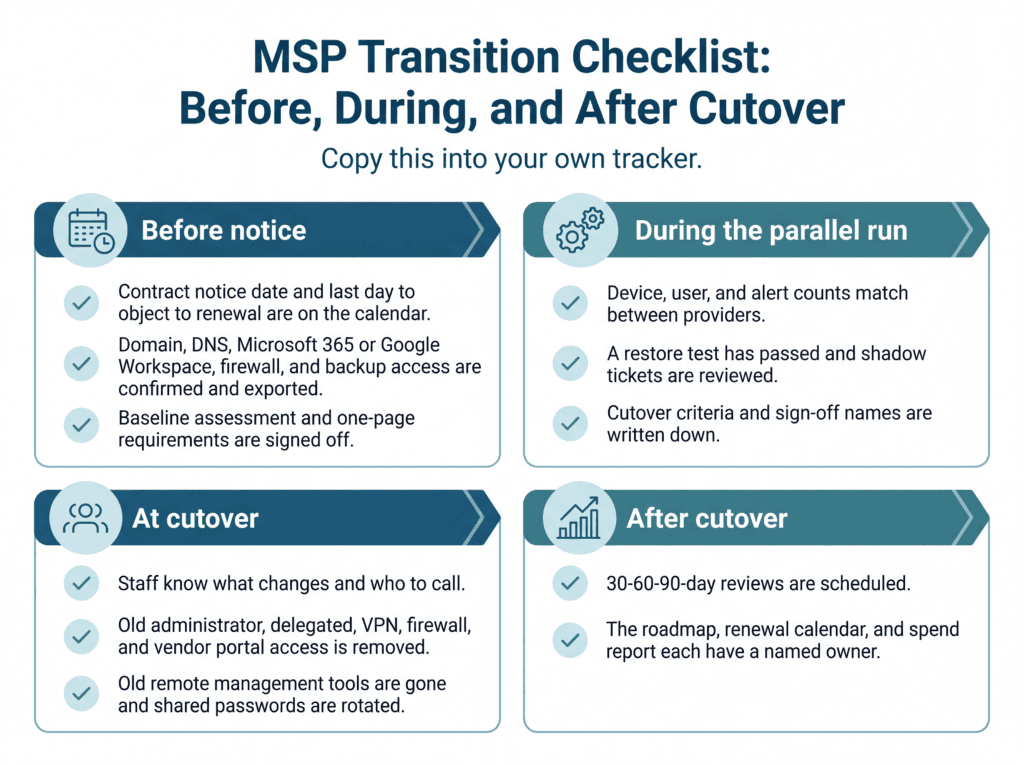
MSP Transition Checklist: Before, During, and After Cutover
Copy this into your own tracker.
Before notice
- Contract notice date and last day to object to renewal are on the calendar.
- Domain, DNS, Microsoft 365 or Google Workspace, firewall, and backup access are confirmed and exported.
- Baseline assessment and one-page requirements are signed off.
During the parallel run
- Device, user, and alert counts match between providers.
- A restore test has passed and shadow tickets are reviewed.
- Cutover criteria and sign-off names are written down.
At cutover
- Staff know what changes and who to call.
- Old administrator, delegated, VPN, firewall, and vendor portal access is removed.
- Old remote management tools are gone and shared passwords are rotated.
After cutover
- 30-60-90-day reviews are scheduled.
- The roadmap, renewal calendar, and spend report each have a named owner.
Frequently Asked Questions
1. How long does it take to switch managed IT service providers?
A managed SSP for a mid-sized organization typically takes between six and ten weeks to assess, review and select a provider, on-board, run parallel and complete the cut over process. Some environments may transition sooner than others, such as multi-site or regulated organizations, which require more time. There should be a 30, 60, and 90 day review process after the initial transfer.
2. Can businesses switch MSPs without downtime?
A carefully planned transition can minimize the risk of unplanned downtime, although uninterrupted service cannot be guaranteed. Secure administrative access, maintain temporary provider overlap, and validate critical systems before cutover.
3. Is there a risk of data loss when changing IT providers?
Ownership and access should continue to be present in your business with regard to your data and your company’s accounts. However, software-licenses, subscriptions and provider-managed services are not always transferable, because of contractual terms & vendor licensing policies. Before retiring, be sure to check owners access to Microsoft 365 or Google Workspace, your domain registrar, and your backups.
4. How much do managed IT services cost for a mid-sized business in 2026?
For 50 to 150 users, one 2026 benchmark runs $110 to $400 per user per month, with standard programs between $120 and $220. Compliance support such as HIPAA adds roughly $30 to $50 per user.
5. What should I ask a new MSP before signing?
Ask about guaranteed response times, what counts as a project, who owns documentation, how callers are verified, and what the exit terms are. Request references from companies of your size and industry.
6. What’s the difference between an MSP and a virtual CIO?
An MSP handles day-to-day support such as the help desk, patching, and monitoring. A virtual CIO provides strategy: roadmaps, budgets, and vendor management. Mid-sized companies often need both, ideally from one accountable partner.
7. Is co-managed IT a good option for mid-sized companies?
Yes, if you already have internal IT staff. Your team keeps ownership while an outside provider fills gaps like security monitoring or after-hours support, at a benchmark of $65 to $120 per user per month.
Ready to See Where Your IT Stands?
Before you call a single provider, do three things this week. Find your contract’s notice date. List every administrator account and who holds it. Ask for the result of your last backup restore test. Those three answers will show you how urgent a switch really is.
If you want an outside view first, Consltek’sIT Blueprint assessment is a practical place to start.
Need Expert Help?
Schedule a consultation with our team to discuss your specific security needs.
Book a Free Consultation