Most vulnerability scan reports begin with a severity score. However, severity alone cannot show whether attackers are already exploiting a weakness. CISA’s Known Exploited Vulnerabilities (KEV) catalog helps address this gap by identifying vulnerabilities with evidence of exploitation. The date a vulnerability enters the catalog is not necessarily the date attacks began, but its inclusion provides an important signal for prioritizing remediation.
Severity describes the potential impact of a vulnerability, while KEV inclusion confirms that exploitation has occurred. Combining these signals with asset exposure and business impact helps determine what to scan, how quickly to respond, and how to verify remediation.
Why Vulnerability Scanning Matters More for US Businesses in 2026
Over the past year, attackers got more effective with known flaws while defenders got slower at closing them. That calls for a tighter routine, not alarm.
Vulnerability Exploitation Is Now a Leading Breach Entry Point
Verizon’s 2026 Data Breach Investigations Report found that exploiting a vulnerability was the first step in 31% of breaches, up from 20% a year earlier and ahead of credential abuse at 13%, according to SecurityWeek’s coverage. Two caveats keep that number honest. Verizon began tracking pretexting this year, which pulled some incidents out of the credential category (Descope). And on a like-for-like basis, phishing plus credential abuse still sits at roughly the same level as exploitation (Push Security). The fair reading is that exploitation has caught up with identity as a way in. Passwords did not stop mattering.
The repair side is where the calendar should change. Only 26% of critical KEV vulnerabilities were fully remediated during 2025, down from 38% the year before (Help Net Security), and the median time to fix a known exploited flaw was 43 days (watchTowr). As of February 2026, the catalog contained 1,526 vulnerabilities, of which 991 had recorded exploitation activity during the preceding twelve months (Nucleus Security). This demonstrates that many previously identified vulnerabilities continue to present significant security risks.
CISA asks every organization, not only federal agencies, to treat the catalog as an input to prioritization (CISA). We agree, and we recommend using the KEV catalog as a primary prioritization input alongside asset exposure, current threat intelligence, and business impact.
Your move: download the KEV feed this week and match it against your asset list. Anything internet-facing that matches goes to the top of the queue.
The Real Cost of an Unpatched Weakness for Mid-Sized Companies
IBM’s 2026 Cost of a Data Breach study, as reported by CFO.com, found that the average cost of a data breach in the United States reached $11.5 million, an increase of 13%. Across the organizations studied globally, the average time to identify and contain a breach was 247 days, while healthcare remained the costliest industry, with an average breach cost of $6.64 million. These are averages across the organizations IBM studied, so a mid-sized company can land well above or below them.
We would plan around what drives the figure instead: days of downtime, notification and legal work, and the effect on customer contracts and insurance renewals.
Your move: pick your three most important systems, estimate the cost of a day without each, and multiply by a realistic recovery time. Set that beside the annual cost of a scanning program.
What Vulnerability Scanning Services Actually Include
A scan is one step in a chain of five. Providers that sell only the scan leave you holding the other four.
Asset Discovery and Scope Definition
You cannot scan what you do not know you own. In September 2025, CISA’s Emergency Directive 25-03 started with a basic instruction: account for every Cisco ASA and Firepower device, then patch or retire them. CISA’s later guidance clarified that this meant all such devices, not only the ones facing the internet.
Your move: build the inventory from three sources, not one: your DNS and cloud accounts, a network discovery sweep, and your endpoint management tool. Give every asset an owner and a business purpose, and flag anything the vendor no longer supports.
Scanning, Validation, and False-Positive Removal
Scanners report what they can detect, and detection depends on access. Credentialed scans run a wider set of checks than scans without credentials, which tends to produce more accurate results (Tenable documentation). Even so, someone should confirm the findings that matter before they reach an engineer’s queue.
Your move: select 20 critical findings from your latest scan and validate them using appropriate, non-disruptive methods. Calculate the proportion of false positives within this sample to identify potential accuracy issues and determine whether further review is necessary.
Risk-Based Prioritization
A severity score is a starting point. Our preferred approach combines known exploitation, internet exposure, business criticality, technical severity, and existing security controls. KEV-listed vulnerabilities deserve urgent attention, but remediation priorities should also reflect the likelihood of exploitation and the potential impact on affected systems.
Prioritization has limits too. In Verizon’s data, 83% of privilege escalation incidents involved no CVE at all (Axonius analysis), a reminder that scanning covers known software flaws and not every weakness in how systems are configured and trusted.
Your move: document risk-based remediation targets on one page. As an illustrative starting point, prioritize actively exploited vulnerabilities on internet-facing systems for immediate action, address other confirmed exploited vulnerabilities within two weeks, and use 30- and 90-day targets for lower-priority findings where justified by business risk. Adjust these targets to applicable regulatory, contractual, and operational requirements.
Remediation Guidance and Rescan Verification
A vulnerability finding should be closed only when appropriate verification confirms that the identified weakness has been resolved or an approved mitigation is effective. Patches fail, services restart on old versions, and a mitigation can be applied to the wrong host. Guidance should also be practical: the exact version to move to, the setting to change, or the compensating control when patching has to wait.
Your move: require appropriate remediation evidence, such as successful rescans, patch-version checks, configuration validation, or approved mitigation records, before closing critical and high-risk findings. Track any findings that reappear.
Executive and Compliance Reporting
Leadership does not need a CVE list. It needs to know whether exposure is shrinking, what is blocked, and who owns the exceptions. Compliance reviewers need the same facts with dates attached.
Your move: produce one page a month with four numbers: open known-exploited findings, their median age, findings past target date, and exceptions that expire next quarter.
Types of Vulnerability Scans a Provider Should Offer
No single scan type covers an environment, so a provider should explain which combination fits yours.
External vs. Internal Vulnerability Scanning
External scans show what the internet sees. In June 2025, GreyNoise honeypots recorded exploitation attempts against the Citrix NetScaler flaw known as CitrixBleed 2 nearly two weeks before public proof-of-concept code appeared, and CISA added it to the KEV catalog on July 10 with a one-day deadline for federal agencies (BleepingComputer). The lesson is about timing. Exploitation can start before the catalog entry, so a quarterly calendar alone will not keep up with remote access gateways, which Verizon’s data shows are among the most commonly exploited asset types (watchTowr).
Internal scans answer a different question: what could someone reach after landing on one machine?
Your move: consider weekly external scans and at least quarterly internal scans as a baseline, adjusting the frequency according to business risk and compliance obligations. When a new KEV entry affects an inventoried asset, assess its exposure promptly and perform targeted scanning or verification where needed.
Authenticated vs. Unauthenticated Scans
An unauthenticated scan sees the outside of a system. An authenticated one sees what is installed and how it is configured. Tenable has noted that its customers run unauthenticated scans about twenty times more often than authenticated ones (Tenable), which suggests many programs are seeing less than they believe. PCI DSS 4.0.1 also requires internal scans to be authenticated (USD AG).
Your move: create dedicated scanning accounts with the minimum privileges needed to perform the required checks, begin with servers, and track the percentage of assets where authentication succeeds.
Network, Web Application, and Cloud Scanning
Network scans find missing patches and exposed services. They do not test how an application handles input, which is why web applications need their own scan; they are among the most commonly exploited asset categories in the DBIR (watchTowr). Cloud adds a third layer: workloads, images, and configuration that change by the day.
Your move: list your applications by exposure and put the externally reachable ones into web application scanning first.
Table 1 summarizes the limitations of different vulnerability-scanning methods and the additional security checks needed to address those gaps.
Table 1. Coverage Gaps and Complementary Approaches in Enterprise Vulnerability Assessment
| Scanning method | Potential blind spot | Complementary security check |
| External network scanning | Internal-only vulnerabilities and local software weaknesses | Internal authenticated scans |
| Authenticated host scanning | Application business-logic and authorization flaws | Application security testing and penetration testing |
| Web application scanning | Vulnerable operating-system packages and underlying host services | Host and dependency scanning |
| Cloud workload scanning | Excessive IAM privileges and insecure tenant-level settings | Cloud posture and identity configuration reviews |
| Container image scanning | Vulnerabilities or exposures introduced at runtime | Runtime security and configuration monitoring |
Microsoft 365 and Azure Environments
In July 2025, the SharePoint flaws known as ToolShell were added to the KEV catalog within days of each other (CISA, The Hacker News). They affected on-premises SharePoint servers only (Security Affairs). That detail matters for hybrid shops: a company can be fully cloud-based in its Microsoft 365 tenant and still run an old SharePoint server in a back room.
Your move: inventory any on-premises SharePoint or Exchange servers, scan Azure virtual machines with credentials, and review tenant settings such as conditional access separately, since a CVE scanner will not assess those.
AWS and Multi-Cloud Workloads
AWS recommends Amazon Inspector for continuous vulnerability assessment of supported workloads, including Amazon EC2 instances, container images in Amazon ECR, and AWS Lambda functions. Organizations subject to applicable PCI DSS external scanning requirements must separately arrange quarterly scans through a PCI SSC Approved Scanning Vendor.
The broader point holds beyond PCI: native cloud scanners cover workloads well, but they create a second findings queue unless you merge it with the first.
Your move: enable appropriate native vulnerability-scanning capabilities across relevant cloud accounts and supported workloads, consolidate findings with on-premises results, and apply consistent risk-based remediation targets.
Vulnerability Scanning for US Compliance Requirements
Each framework asks for scanning in its own words. Our advice is to run one program and reuse its evidence everywhere.
PCI DSS 4.0.1 (Internal and ASV External Vulnerability Scanning)
PCI DSS 4.0.1 requires applicable internal vulnerability scans at least once every three months under Requirement 11.3.1, with authenticated scanning requirements under 11.3.1.2. Requirement 11.3.2 requires external scans at least once every three months by a PCI SSC Approved Scanning Vendor (ASV), with vulnerabilities resolved and rescans performed as needed to achieve passing results. Additional internal and external scanning requirements apply after significant changes. Internal scans do not require an ASV but must meet the standard’s applicable personnel and independence requirements.
Your move: start each quarter’s ASV scan about three weeks before quarter end so there is time to fix and rescan.
HIPAA Security Rule for Healthcare Organizations
The current HIPAA Security Rule requires covered entities and business associates to conduct risk analyses but does not prescribe a universal vulnerability-scanning interval. A proposed update published in January 2025 would require vulnerability scanning at least every six months and penetration testing at least once every twelve months. As of October 2026, these requirements remain proposed rather than mandatory. The federal regulatory agenda lists July 2027 as a projected date for final action, while the existing Security Rule continues to apply.
Our view is plain: establish a risk-based scanning schedule for systems that create, receive, maintain, or transmit electronic protected health information (ePHI), and incorporate the findings into your organization’s risk analysis and risk-management process.
Your move: document a risk-based scanning schedule for systems handling electronic protected health information, assign remediation owners, and maintain evidence of identified and resolved vulnerabilities.
CMMC 2.0 and NIST SP 800-171 for Defense Contractors
CMMC Phase 1 began on November 10, 2025. On July 13, 2026, the US Department of War announced the suspension of Phase 2 requirements, which had been scheduled to take effect on November 10, 2026, while the program undergoes review. Phase 1 self-assessment requirements remain in effect, alongside applicable NIST SP 800-171 Revision 2 security obligations.
CMMC Level 2 practice RA.L2-3.11.2, derived from NIST SP 800-171 Revision 2, requires vulnerability scanning of organizational systems and applications periodically and when newly identified vulnerabilities affect those systems and applications (Stingrai).
A pause in assessments is not a pause in the control.
Your move: keep dated scan reports and rescans together in your system security plan evidence folder.
SOC 2, Cyber Insurance, and Customer Security Questionnaires
SOC 2 does not prescribe one universal vulnerability-scanning interval, while cyber insurers and customers may impose their own assessment requirements. Organizations should define a risk-based scanning schedule, follow it consistently, and retain evidence of completed scans and remediation.
Your move: write the policy first, then confirm you can produce the last four scan cycles with owners and closure dates.
Table 2 compares vulnerability-scanning obligations and supporting audit evidence across common US compliance and assurance frameworks.
Table 2. Vulnerability Scanning Obligations and Supporting Audit Evidence Across Common US Assurance Frameworks.
| Framework | Current scanning obligation | Evidence worth retaining |
| PCI DSS 4.0.1 | Internal and ASV external scans at least quarterly; applicable additional scanning requirements also apply. | Dated reports, ASV passing evidence, remediation records and relevant authentication evidence |
| HIPAA Security Rule | Risk analysis is mandatory; no universally prescribed scanning interval under the current rule. | Risk analysis, vulnerability assessment results, remediation decisions and risk-management records |
| CMMC Level 2 / NIST SP 800-171 Rev. 2 | Periodic scanning and scanning when newly identified vulnerabilities affect systems | Approved procedures, scan results, system inventory, findings and remediation records |
| SOC 2 | No universal scanning interval prescribed by the SOC 2 framework | Scanning policy, evidence that controls operated, exceptions and remediation history |
In-House Scanning Tools vs. Managed Vulnerability Scanning Services
The real question is who does the work after the scan finishes.
What Free and Commercial Scanners Do Well
Scanners are fast, repeatable, and broad on known flaws. For a small, stable environment with someone who owns the output, a well-configured scanner may be all you need.
Your move: if you stay in-house, name one owner and one backup, and put the scan schedule on a shared calendar.
Where DIY Scanning Programs Break Down
The scanner is rarely the weak point. The follow-through is. Findings need validation, owners, deadlines, and rescans, and these are the tasks that slip when the same two people also run helpdesk. The 43-day and 26% figures earlier show that slippage at scale.
Your move: look at last quarter’s critical findings. How many closed, and in how many days? If you cannot answer in five minutes, you have found the gap.
When a Managed Service Makes Financial Sense
We see four situations where it usually pays off: no dedicated security staff, a mix of on-premises and cloud systems, compliance evidence due on a schedule, and a backlog of findings nobody has time to validate.
Your move: multiply the monthly hours spent on triage, ticketing, and rescans by a loaded hourly rate, then compare the result with a quote that includes validation and rescans.
How Much Do Vulnerability Scanning Services Cost?
We will not print a price range, because scope drives the number so heavily that any figure would mislead. Here is how quotes are built, so you can compare them fairly.
Factors That Affect Pricing
Five things move the price most: the number of assets in scope, how much of the scanning is authenticated, how often scans run, whether web applications are tested, and whether validation, remediation guidance, and rescans are included or billed separately. Compliance scanning that needs an ASV adds its own line.
Your move: ask every provider to break the quote into scanning, validation, rescans, and reporting. A low price that excludes rescans is not low.
One-Time Scan vs. Ongoing Managed Program
A one-time scan makes sense for a baseline, an audit preparation, or a new environment. It ages quickly, though. With hundreds of known exploited flaws active in a single year, a snapshot soon stops describing your exposure. An ongoing program pays for prioritization, ownership, and proof of repair.
Your move: start with a baseline, then use what it finds to set the cadence. Environments with many internet-facing systems need more frequent scans than those with few.
How to Choose a Vulnerability Scanning Services Provider in the USA
Choose on process, not tooling. Most credible providers use similar scanners; what differs is what happens to the output.
7 Questions to Ask Before You Sign
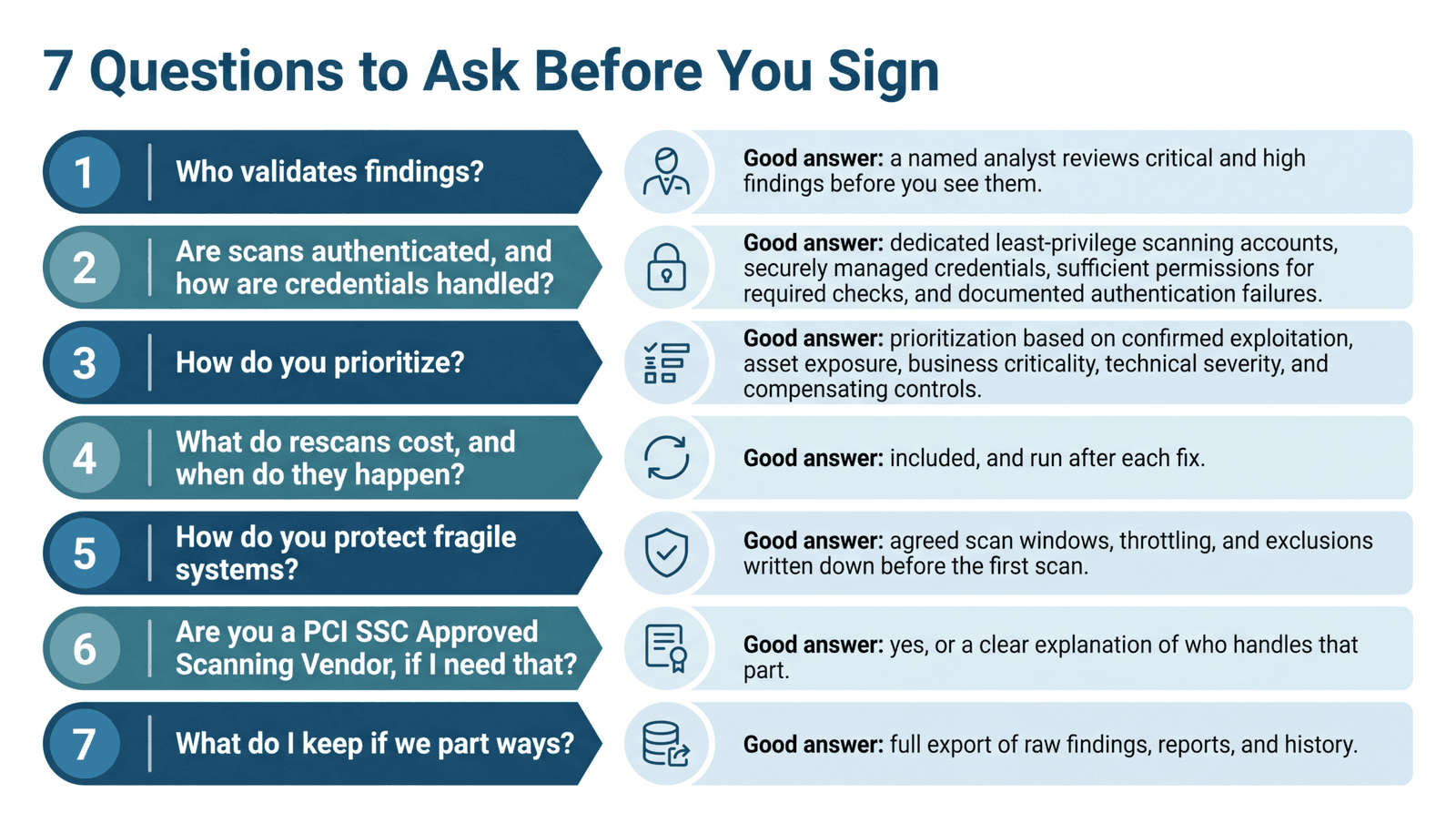
Your move: send these seven questions in writing and compare answers side by side. Vague answers are information.
Red Flags in a Scan Report
Ask for a sample report before signing. Two problems show up quickly.
Raw Scanner Output With No Context
Hundreds of pages sorted by severity, with no asset owners, no business context, and no mention of known exploitation, is a data export, not a service. Your move: ask the provider to show how they would turn their sample into a one-page action list.
No Remediation Verification
A report that marks findings as resolved without supporting verification evidence does not demonstrate successful remediation. Your move: require dated verification records, such as scan references, patch-validation results, configuration checks, or approved mitigation evidence, for closed findings.
How Consltek Delivers Vulnerability Scanning Services
We build the work around one idea: a scan report is a work order, not a deliverable. It only counts once the fix is confirmed.
Our Approach: Find → Validate → Prioritize → Remediate → Verify
Here is a 30-day roadmap you can run yourself or with a partner. Treat the timing as a starting point.
- 1Find (days 1 to 5). Build the asset inventory and define scope, including any systems that need gentler scan settings. You end with: an asset list with owners and a note on what is out of support.
- 1Validate (days 6 to 12). Run authenticated scans where supported and validate critical and high-risk findings. You end with: a reviewed findings list and an assessment of false positives identified during validation.
- 1Prioritize (days 13 to 15). Rank findings according to confirmed exploitation, internet exposure, business criticality, technical severity, and existing security controls. Escalate urgently exploitable vulnerabilities immediately rather than waiting for the scheduled prioritization stage. You end with: a ranked list with an owner and target date on every item.
- 1Remediate (days 16 to 28). Work with the responsible technical teams to prioritize and implement patches, configuration changes, or appropriate compensating controls, beginning with the highest-risk findings. You end with: change records and a documented, time-limited exception for anything that must wait.
- 1Verify (days 29 to 30). Confirm completed fixes through targeted rescanning or other appropriate verification methods, and document any unresolved exposures. You end with: a before-and-after report you can show a board, an auditor, or an insurer.
After that, move to a standing cadence, and rerun steps one and two whenever a new KEV entry matches your inventory. We stay vendor-independent, so the choice of scanner follows your environment, not a reseller arrangement.
Industries We Support (Healthcare, Manufacturing, Financial Services, Education, Government)
- Healthcare: the sector with the highest average breach cost in IBM’s study. Scan windows and exclusions for clinical devices matter as much as the scan itself.
- Manufacturing: older production equipment often cannot tolerate aggressive scanning, so scope, timing, and throttling are agreed in advance.
- Financial Services: organizations subject to PCI DSS must maintain applicable vulnerability-scanning evidence, while other financial institutions may need dated security reports to support customer due diligence and regulatory examinations.
- Education: lean IT teams and a wide mix of devices make a ranked, owner-assigned list more useful than a long one.
- Government: federal agencies can use KEV-aligned vulnerability management to address known exploited threats, while defense contractors must also maintain evidence relevant to applicable CMMC and NIST SP 800-171 requirements.
Start With a Vulnerability Scan
If you do one thing this week, compare your internet-facing assets against the KEV catalog. If you would like a second set of eyes on the baseline, book a vulnerability scan with Consltek.
Frequently Asked Questions About Vulnerability Scanning Services
1. How much do vulnerability scanning services cost?
It depends on how many assets are in scope, how often you scan, whether scans are authenticated, and whether validation and rescans are included. A one-time scan costs less than an ongoing program, but the ongoing program covers prioritization and proof of repair. Ask for a quote broken into those parts.
2. Is vulnerability scanning required for PCI DSS compliance?
Yes. PCI DSS 4.0.1 requires applicable internal and external vulnerability scanning at least once every three months. Quarterly external compliance scans must be performed by a PCI SSC Approved Scanning Vendor (ASV), while internal scanning follows separate requirements. Identified vulnerabilities must be addressed and rescanned as required to demonstrate compliance. Additional scanning requirements apply after significant changes.
3. Does HIPAA require vulnerability scanning?
The current HIPAA Security Rule requires a risk analysis but does not establish a fixed vulnerability-scanning interval. Vulnerability scanning is a useful method for identifying security weaknesses and supporting risk management. A January 2025 proposal would introduce scanning at least every six months, but this requirement has not been finalized as of October 2026.
4. Will a vulnerability scan slow down or disrupt my network?
A well-planned scan rarely does. Agree on scan windows, speed limits, and exclusions for fragile devices before the first run.
5. How long does a vulnerability scan take?
A small external scan can finish in minutes. A full authenticated scan of a larger environment can take hours. The whole engagement runs longer, since validation, fixes, and rescans take days to weeks.
6. Can I use free vulnerability scanning tools instead of a service?
Often, yes, especially for small environments with in-house skills. The gaps appear after the scan: validation, ownership, fix deadlines, rescans, and reporting. If your team already covers those, a free tool may be enough.
7. What should a vulnerability scanning report include?
The scope, validated findings ranked by risk, a flag for KEV-listed vulnerabilities, clear remediation steps, an owner and target date for each item, and documented verification evidence, including rescan results where appropriate.
Need Expert Help?
Schedule a consultation with our team to discuss your specific security needs.
Book a Free Consultation